
Table of Contents
- Easy to Use Home Productivity Tools: What Actually Saves Time
- Productivity Tools for Working from Home: Setting Up Your Space
- Time-Saving Gadgets for Busy Professionals: Where Minutes Add Up
- Household Organisation Tools That Earn Their Place
- Simple Productivity Apps and Physical Tools: Which Do You Need?
- How to Choose Easy to Use Home Productivity Tools
- Frequently Asked Questions
Last Updated: 13 October 2026
Easy to Use Home Productivity Tools: What Actually Saves Time
The best easy to use home productivity tools are the ones you set up once and forget about, because they quietly remove a small daily annoyance. This guide covers the home productivity tools worth your money, sorted by the job they do.
Most gadget drawers are full of things that promised more than they delivered. The pattern is predictable: a product needs an app, a manual, and fifteen minutes of fiddling before it does anything useful. That friction is why so many tools end up unused. The picks below are chosen for the opposite quality. They work the first time and keep working.
Below, we'll show you exactly how to sort the genuinely useful from the gimmicks, and which categories tend to earn their place on a desk or kitchen counter.
Productivity Tools for Working from Home: Setting Up Your Space
Start with the desk itself, because the biggest time losses at home come from small interruptions, not big tasks. A charging cable you hunt for, a lamp you switch on separately, a phone you check because it is already in your hand: these add up across a working week. The fix is to combine functions so fewer objects compete for the same space.
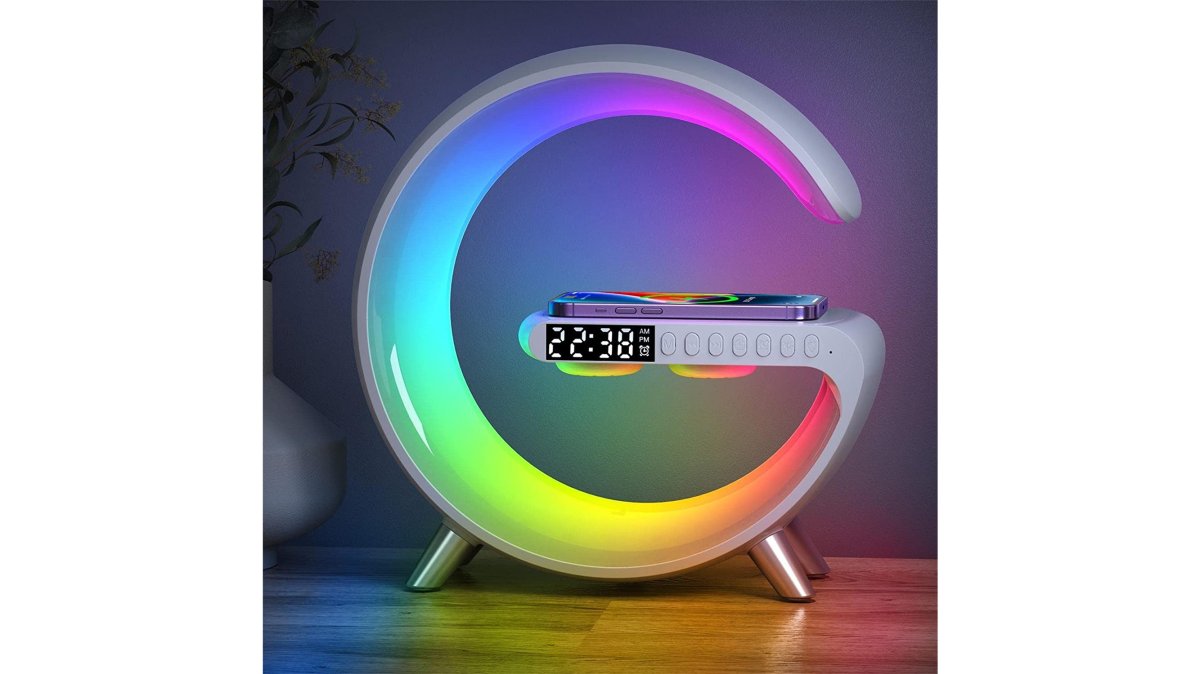
The Charger Lamp is a good example of this approach. It is a bedside and desk lamp, a phone charger, and an alarm in one unit, with a 15W fast charger built into the deck. You place your phone on the charging surface and adjust brightness through the app. That removes two separate devices and the cable clutter that comes with them.

For anyone juggling several remotes, the Infrared Phone Adapter (£14.99) handles a different kind of clutter. It plugs in and lets you control up to 15 devices from your phone, including televisions, air conditioners and lights. Setup is straightforward and it works with devices that use IR signals.
Time-Saving Gadgets for Busy Professionals: Where Minutes Add Up
Time-saving gadgets for busy professionals pay off when they replace a repeated action, not when they add a new one. The test is simple: does this remove a step you perform most days? If yes, it earns its place. If it only helps in a scenario you hit twice a year, it does not.
Measurements are a quiet example. Anyone who has hung shelves, ordered furniture or planned a room layout knows the frustration of a tape measure that slips, bends or needs a second pair of hands. The Digital Measurement Tape (£35.99) has five settings for straight, spherical and corner surfaces, so you get the number without the workaround.

Household Organisation Tools That Earn Their Place
Household organisation tools should reduce decisions, not create new ones. A storage box that needs labelling, sorting and a dedicated shelf is often more work than the mess it solved. The tools that last are the ones with an obvious home and an obvious use.
The LCD Calculator (£32.99) combines a calculator with a writable LCD panel, so you can work through figures and jot the workings on the same surface.
The LED Note Board (£23.99) takes a similar approach to reminders. You write or draw on it, and erasing is just as simple. It suits a kitchen wall or a hallway, where a shopping list or a weekly plan needs to be visible rather than buried in a phone.
| Tool | Price | Job it does | Best for |
|---|---|---|---|
| Charger Lamp | £59.99 | Light, phone charging and alarm in one | Bedside or desk setup |
| Infrared Phone Adapter | £14.99 | Controls up to 15 devices from your phone | Rooms with several remotes |
| Digital Measurement Tape | £35.99 | Measures straight, spherical and corner surfaces | DIY and furniture planning |
| LCD Calculator | £32.99 | Calculator plus writable note panel | Budgets and paperwork |
| LED Note Board | £23.99 | Writable, erasable notes and reminders | Kitchen and hallway walls |
Simple Productivity Apps and Physical Tools: Which Do You Need?
Simple productivity apps are best for anything that changes, syncs or needs to reach another person. Physical tools are best for anything you touch, measure or glance at. Sorting your needs along that line prevents the most common mistake: buying an app for a job a notepad does better, or a gadget for a job that belongs in software.

Use this as a quick decision framework:
- If the information changes often and needs sharing, choose an app. Shared lists, calendars and reminders fall here.
- If the information is fixed and needs to be seen at a glance, choose a physical tool. Measurements, notes and reminders on a wall fall here.
- If the task involves a physical action, such as charging, measuring or controlling a device, a physical tool wins. Apps cannot charge a phone or measure a corner.
- If the task is purely administrative, an app almost always wins. It is cheaper and updates itself.
The overlap is where the strongest products sit. A lamp that charges a phone, or a calculator that doubles as a notepad, covers a physical job and a small administrative one at once. That is usually a better buy than two single-purpose items competing for the same surface.
How to Choose Easy to Use Home Productivity Tools
Choosing well comes down to four checks, and they take less than a minute each. Run every candidate through them before you buy, and the gadget drawer stays empty.
- Does it replace a step you already take? If it adds a step, it will not stick.
- Does it need an app, a subscription or a manual? Setup friction is the main reason tools get abandoned.
- Does it fit the space you have? A tool that needs its own shelf is a net loss in a small kitchen or a shared desk.
- Does it do more than one job? Combined functions save space and reduce the number of things you maintain.
For further reading on how daily friction affects output, the Health and Safety Executive's guidance on workstation setup is a useful reference for anyone building a home workspace, and Which?'s advice on buying household products covers how to assess quality before you commit. On the software side, the National Cyber Security Centre's guidance on using apps safely is worth a look before you hand over permissions to any productivity app.
If you would rather skip the research, our range is built around exactly these four checks.
The real challenge is not finding clever gadgets; it is finding the few that survive past the first week. Most homes do not need more tools, they need the right three or four. Start with the category where you lose the most time, whether that is charging, measuring, planning or controlling devices, and build from there.
At Cooperrite.com, we stock practical home and lifestyle gadgets chosen for daily use, including the Charger Lamp with its 15W fast charging and app-controlled lighting, the Digital Measurement Tape with five measuring settings, and the Infrared Phone Adapter that controls up to 15 devices from one phone. Browse the range and add the one that removes your most repeated task first.
Frequently Asked Questions
What are the best productivity tools to use at home?
The best home productivity tools solve a specific daily friction point. A charger lamp like the Cooperrite Charger Lamp (£59.99) combines lighting, phone charging, and an alarm in one unit, saving bedside space. A digital measurement tape (£35.99) speeds up DIY tasks with five settings for straight, spherical, and corner surfaces. An infrared phone adapter (£14.99) controls up to 15 devices from your phone. Choose tools that replace two or three separate items rather than adding another gadget to manage.
Which productivity tools are easiest for beginners to use?
Look for tools that work straight out of the box with minimal setup. The Infrared Phone Adapter is plug-and-go and controls up to 15 devices using just your phone. The LCD Calculator (£32.99) opens and works immediately, with a pen-to-pad LCD panel for notes. The Charger Lamp requires only an app download to adjust brightness. Avoid tools that need accounts, subscriptions, or complex configuration before they do anything useful.
How can I be more productive at home?
Start by identifying the tasks that eat time each day: hunting for chargers, measuring twice because the first attempt was wrong, or juggling multiple remotes. Replace those friction points with tools that do more than one job. A charger lamp handles lighting and charging. A digital measurement tape gives accurate readings on straight, spherical, and corner surfaces without a second pair of hands.
Are productivity apps or physical tools better for home use?
They serve different purposes. Simple productivity apps handle scheduling, notes, and reminders, but they cannot charge your phone or measure a shelf. Physical tools like the LCD Calculator or Digital Measurement Tape remove manual steps entirely. The most effective setup combines both: an app to control your Charger Lamp's brightness, and a physical tool like the Infrared Phone Adapter to replace a drawer full of remotes.
What should I look for in a home productivity tool?
Check three things: whether it replaces more than one item, how long setup takes, and whether it fits your space. The Charger Lamp replaces a lamp, charger, and alarm. The Infrared Phone Adapter replaces up to 15 remotes. The LED Note Board (£23.99) gives kids a reusable drawing surface that erases easily. Prioritise tools you can use within five minutes of unboxing.


